Notion Template: Your Notion Life Planner
More Than a To-Do List: A System for Clarity
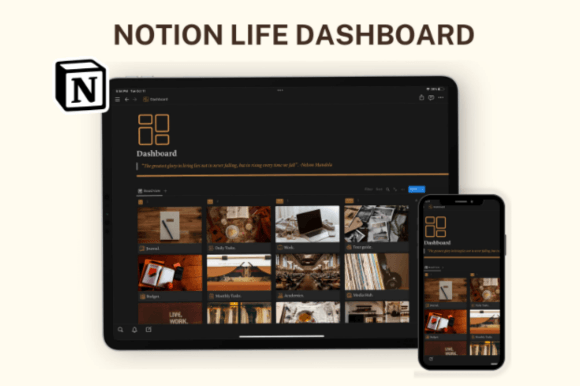
Let's be honest. Most digital planners feel like a chore. They're cluttered with bright colors, endless notifications, and a design that screams "more work." You open them, feel a spike of anxiety, and close them. The Notion Life Planner is built on a different principle. It's not just a Notion Template; it's a minimalist operating system for your life. The visual design is intentionally chic and distraction-free, using a curated palette of soft neutrals and clean, modern typography. This isn't about flashy features; it's about creating a calm, focused space where you can think clearly and plan effectively. The aesthetic is professional yet personal, much like a well-designed studio or a thoughtfully arranged workspace.
The personality of this template is that of a quiet, competent assistant. It doesn't demand your attention with loud alerts. Instead, it provides a structured, beautiful framework that encourages mindful planning. The color-coordinated sections aren't just decorative; they serve as visual cues, helping you instantly navigate from your Daily Tasks to your Health Planner or Media Hub. This thoughtful visual hierarchy reduces cognitive load, making it easier to prioritize what truly matters. For the entrepreneur, the creative, or the busy parent, this translates to less time managing your tools and more time executing your ideas.
A Design Asset That Works as Hard as You Do
Think of this Notion Template as a core design asset for your personal and professional brand identity. Its strength lies in its adaptability. The fully customizable structure means you can mold it to fit your unique workflow. A marketer might use the Monthly Tasks Board for campaign planning and the Budget tracker for ad spend. A content creator could leverage the Media Hub to organize research and the Goals Page to map out a content calendar. A small business owner will find the automated finance tracker indispensable for keeping a pulse on cash flow without wrestling with complex spreadsheets.
The applications extend far beyond basic planning. Consider the Journal Page for reflecting on project wins and challenges, or the Recipes Page for meal prepping to save time during a hectic launch week. The Academics Section is perfect for lifelong learners taking online courses, while the Shopping Section helps manage both personal and business purchases. This is where the template's modern typography and aesthetic design truly shine. It makes engaging with these mundane but essential tasks feel less like administrative work and more like a curated, intentional practice. It's a tool that respects your time and your desire for a cohesive, well-organized life.
Integrating with Your Creative Workflow
For those in design, publishing, or branding, consistency is currency. This Notion Life Planner acts as a central hub that aligns with a professional's need for order and clarity. Use the Work Page to outline client deliverables, track revisions, and manage deadlines. The Tour Guide feature is a clever addition for freelancers who travel, helping you plan trips and meetings without losing track of work projects. The calendar and weather forecast integration on the dashboard provides at-a-glance context for your day, a small but significant detail that aids in planning meetings and commutes.
The real power is in how this system supports your broader creative projects. By automating the tracking of finances, meals, and media consumption, you free up mental bandwidth. That bandwidth can then be redirected toward high-value work: designing a new logo, crafting a social media graphics campaign, or developing a packaging design. The template doesn't just organize your tasks; it creates the mental space necessary for deep, focused work. It’s the unsung hero in the background, ensuring the operational side of your life runs smoothly so your creative side can flourish. The result is a more sustainable and less stressful approach to managing a multifaceted career and personal life.
Getting Started Is Simple
Upon purchase, you receive immediate access. No complicated setup. You'll get a PDF with a direct link to the Notion Template. With one click, you can duplicate it into your own Notion workspace and begin organizing your daily life immediately. Start by exploring the Daily Tasks Section and the priority list. Then, customize the sections that matter most to you. Add a custom database for your specific hobby or business need. Change the color accents if you wish. The framework is robust, but the experience is yours to define. It’s a planning system designed for real people with real, complex lives—not a one-size-fits-all solution that ends up abandoned after a week.