Elevate Your Art Presentation with This Simple Canva Mockup
As a designer or creative entrepreneur, you know that presentation is everything. The way you showcase your work can be the difference between a casual glance and a committed sale. A stunning digital print or a beautiful photograph deserves more than just a flat, lifeless display on a plain white background. It needs context, atmosphere, and a touch of realism to help potential buyers visualize it in their own space. This is precisely where a versatile and easy-to-use tool like the Simple Art Frame Mockup for Canva becomes an indispensable part of your creative toolkit.
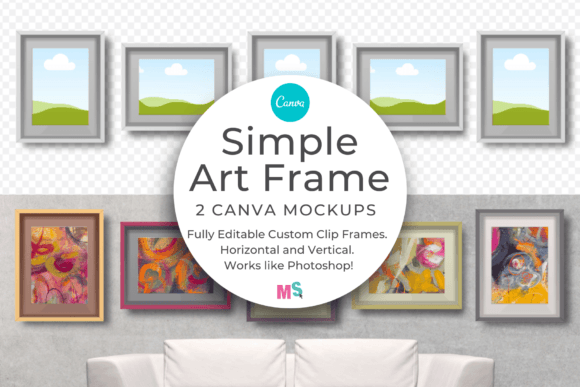
This mockup is designed for the modern creator who values both quality and efficiency. At its core, it provides a clean, minimalist frame that doesn't distract from your artwork but instead elevates it. The visual style is contemporary and understated, allowing your designs, photographs, or printables to take center stage. Its true personality lies in its adaptability. Because both the inner and outer frame colors are fully editable, you can tailor it to match any brand palette, complement the tones in your art, or fit seamlessly into a larger scene you're building. It’s a professional presentation asset that works like a sophisticated piece of design software, but with the incredible accessibility and user-friendliness of Canva.
Transforming Client Presentations and Online Shops
The real-world applications for this simple art frame mockup are vast and directly impact your bottom line. For graphic designers and illustrators, it’s a game-changer for client presentations. Instead of sending a flat JPEG of a logo or a piece of wall art, you can place it inside this frame, set against a textured wall or a stylish interior. This helps clients immediately grasp the scale, impact, and finished look of the work, leading to faster approvals and greater confidence in your vision.
For entrepreneurs running an Etsy shop, a personal website, or any online marketplace, high-quality product imagery is non-negotiable. Using this Canva mockup allows you to create consistent, professional-looking listings for your digital downloads. Imagine showcasing your collection of inspirational quote prints, watercolor art, or graphic designs all presented in the same elegant frame. This consistency builds a strong brand identity and makes your shop look curated and trustworthy. The ability to display your work as it would look hanging on a wall or leaning against a colored background provides crucial context that drives sales. You can use it to create mockups for:
- Portrait and landscape art prints
- Surface pattern designs on paper
- Framed photographs for portfolio or client galleries
- Clip art collections shown in a real-world setting
- Custom graphic design projects for branding kits
A Practical Guide to Using Your Frame Mockup
One of the standout features of this product is its straightforward workflow. You don’t need to be a Canva expert to achieve professional results. After purchasing, you’ll receive a user PDF. Navigate to the final page to find a direct link that opens the template in your Canva account. Inside, you’ll find not just one, but multiple layouts. There’s a horizontal frame for landscape-oriented art and a vertical frame for portraits. As a bonus, the creator has included a layout with two vertical frames side-by-side, which is perfect for showcasing a series or a pair of complementary pieces.
The process is intuitive. You simply click on the placeholder image within the frame and upload your own artwork. The smart object-like functionality ensures your design fits perfectly within the frame's boundaries. From there, the customization begins. Select the frame element and use Canva’s color picker to change its hue to match your brand colors, the dominant color in your artwork, or the background of your final scene. This level of control is what separates a generic mockup from a truly useful design asset. It allows you to maintain visual hierarchy and brand consistency across all your marketing materials, from social media graphics to your website’s portfolio section.
Key Considerations for Maximum Impact
While the mockup is incredibly versatile, a few best practices will help you get the most out of it. First, consider the context. Don’t just place the framed art on a default background. Use Canva’s extensive library of textures, gradients, or interior design photos to create a scene that tells a story. A piece of modern typography art might look stunning against a dark, moody wall, while a delicate watercolor could be complemented by a soft, linen texture.
Second, think about font pairing and visual balance if you’re using the mockup in a larger design, like a social media post or a website banner. The frame itself is a clean, modern typography element. Ensure that any text you add works harmoniously with it. A simple sans serif font often pairs well, maintaining the clean, professional aesthetic. Finally, always review the page notes included within the Canva template. These often contain helpful tips from the creator on advanced customization or best practices for exporting your final image, ensuring you deliver a pixel-perfect result every time. This simple art frame mockup isn’t just a template; it’s a strategic tool for presenting your creative work with the professionalism it deserves.